React.
Dynamic Gain moves a Bell or Shelf band’s gain in response to its frequency region. Set threshold and range to control its direction and depth.
 PIXEL ARCBETA
Meet the full native Windows VST3 chain. Start with the rack, then open Studio FX when it’s time to go deeper.
Move from gentle pitch correction to an unmistakable hard-tuned character. Choose a root and scale, shape the retune response, and transpose the vocal.
Set separate opening and closing thresholds to control the space between phrases. Shape how the gate opens, closes and attenuates.
Roll off unwanted lows, add body and open the top end before the rest of the chain. Three clear controls keep the starting tone within reach.
Choose the sibilant detection region and bring sharp consonants under control. Listen to the removed material while the blue threshold light follows your adjustments.
Use threshold and ratio to bring the performance forward and shape its level. Blend the result with the module mix for a lighter touch.
Add saturation to the vocal and control how much of that character enters the chain. Subtle warmth and stronger edge share one simple module.
Two detuned, delayed voices move to opposite sides of your vocal. Keep the direct path, or turn it off for a voice-only effect return.
Build linked or independent left/right echoes with tempo sync, modulation and saturation. Shape the wet return with its own six-band EQ.
Set the distance, tail and stereo field, then sculpt the reverb return. Dynamic Gain on Bell and Shelf bands responds to the wet signal.
Up to 12 bands with a live grey input spectrum behind the blue processed signal. Change frequency and gain directly on the graph; use the deeper controls to refine the result.
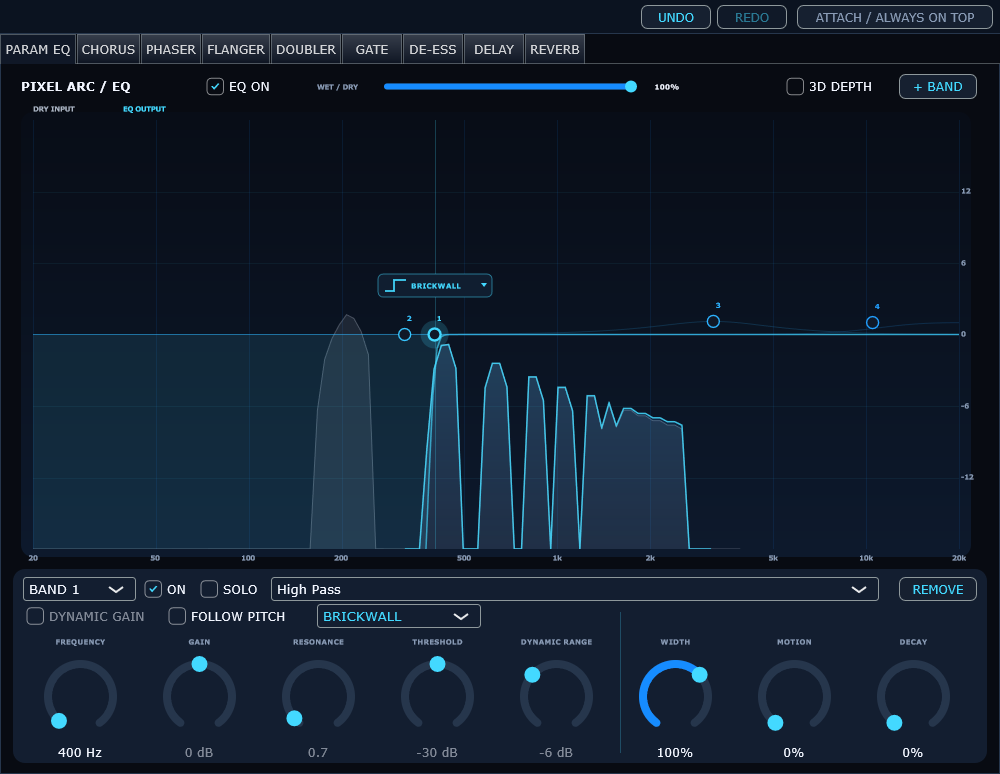
Dynamic Gain moves a Bell or Shelf band’s gain in response to its frequency region. Set threshold and range to control its direction and depth.
Follow Pitch tracks a harmonic of the detected vocal, including Tune’s applied correction when the EQ sits after Tune in the chain.
Audition one band with Solo. High/Low Pass filters offer 12, 24, 48 and 96 dB/oct slopes plus a finite 192 dB/oct Brickwall approximation.
Up to 12 bands. Bell, shelves and pass filters. Dynamic Gain and harmonic pitch following, band Solo and steep slopes up to a finite 192 dB/oct Brickwall setting.
Add moving layers and blend them into the vocal from the separate Studio FX page.
Shape sweeping phase movement with a dedicated Studio FX component.
Create short-delay movement and more pronounced modulation in its own Studio FX component.
Analyze live input or drag in WAV/MP3 files for estimated key and tempo. Apply the detected key to Tune. Beats and instrumentals are welcome too.
Twelve vocal starting presets, a reorderable rack, module mixes, host automation menus, and shared undo/redo in EQ, Gate, De-esser, Doubler, Delay and Reverb.